Cisco MDS Fabric Merge Failure Case

We had ran a MDS fabric merge recently between MDS9509 and MDS9148 and met below two errors during the merging process. These errors could be avoided by configuring the correct setting which is detailed as below:


  • Domain ID Configuration

Error Message: %FCDOMAIN-2-EPORT_ISOLATED: %$VSAN 10%$ Isolation of interface port-channel10 (reason: configured domain ID is different from runtime domain ID)

From the log information, it is clear stated that the Domain ID is mis-matched between running-config and local switch configuration. One of the major reasons is the “fcdomain restart” command is not executed after setting the Domain ID. The “fcdomain restart” command basically applies your changes to the runtime settings and align the configured ID and running ID.

Continue reading

DELL Server Firmware Upgrade by Utilizing DELL Repository Manager

DELL Repository Manager

There are multiple ways to upgrade DELL Server firmware. However, frankly speaking, DELL server upgrade is not easy enough comparing with HP or Cisco Servers. HP provides SPP and Cisco provide HUU/firmware pack for UCS system, which consolidate and align all the driver/firmware to be at the same level to make the upgrade workflow easier. In general, the recommended DELL upgrade workflow and available methods are detailed in the below document.

http://en.community.dell.com/techcenter/extras/m/white_papers/20408841/download.aspx

In this post, we will utilize the DELL Repository Manager to upgrade the Dell Servers.

Continue reading

PowerCLI Script – VMware Storage vMotion Automation

I recently got a task to migrate more than 100 VMware virtual machine from one sets of datastores to another. In order to automate this process, I draft a simple PowerShell script to perform below tasks:

  1. Utilize CSV file as the input; and
  2. The maximum running parallel storage vMotion sessions can be controlled by input option, this is to avoid storage overhead and minimize the impact on the other running applications.

The script is as below:

Continue reading

NetApp SolidFire mNode and ActiveIQ Monitoring

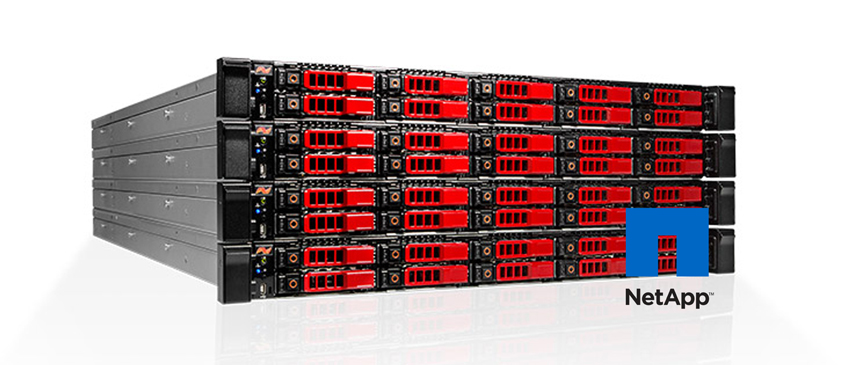
StorageReview-NetApp-SolidFire

This post is to outline the key steps to configure mNode and how to connect SolidFire storage to ActiveIQ site. This post is not intended to cover all the details in the NetApp SolidFire deploy guide, user guide documents or other NetApp official documents.

What is SolidFire mNode?

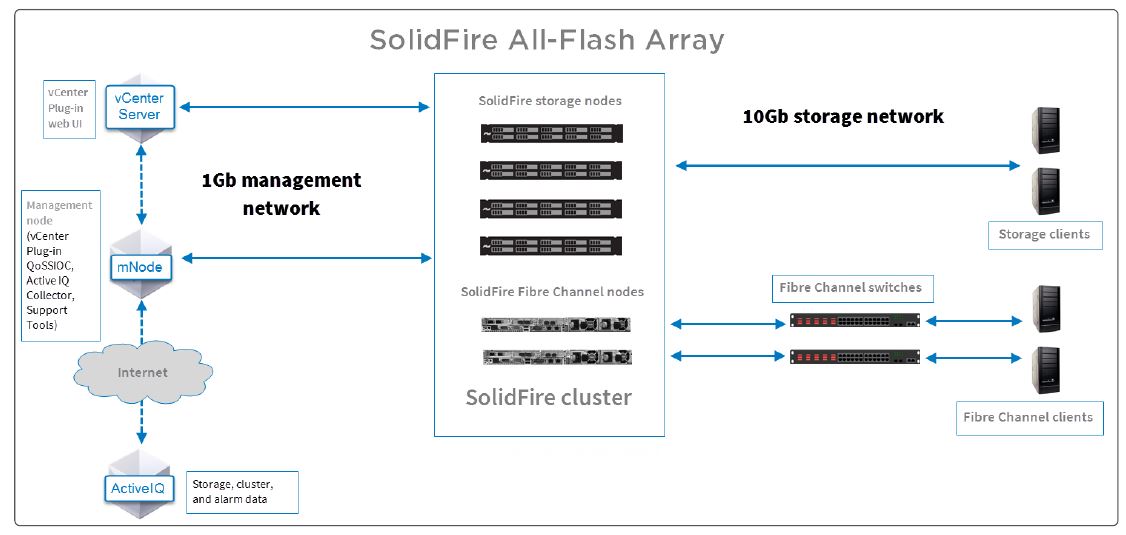
The NetApp SolidFire management node (mNode) is a virtual machine deployed in customer environment to provide below functions:

  • SolidFire Element OS software upgrades;
  • Remote alerting and historical data collection through Active IQ;
  • Remote support tunneling for NetApp Support hands-on access; and
  • Ancillary functions for NetApp SolidFire Plug-in for VMware® vCenter™ functionality and syslog aggregation.

managementnode

Continue reading

Cisco UCS Jumbo Frame Configuration – The CoS Value Matters

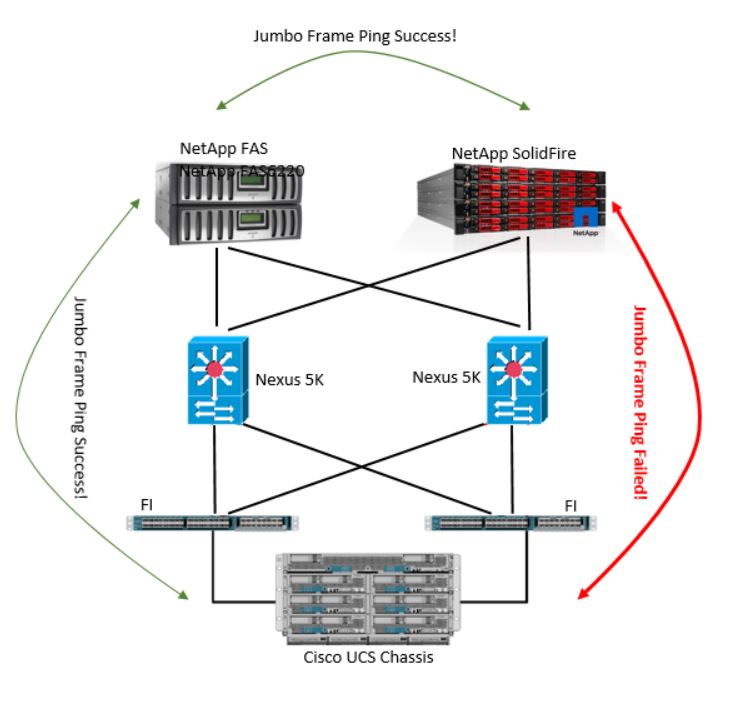
I recently participated a technical trouble shooting regarding UCS jumbo frame setting to support NetApp SolidFire iSCSI storage. When the UCS MTU value in QoS setting is changed to 9216, the connection between UCS and NetApp SolidFire is lost. However, the new UCS QoS setting could be supported by the NetApp FAS iSCSI system in the same environment. A diagram as below illustrates the situation.

UCS_Jumbo_Frame_Issue

Continue reading

Unity File Replication – 3 things you need to know as a VNX/Celerra user

Although Unity has been in the market for more than a year, until recently, I got a chance to configure a pair of Unity with file replication.  If you were a VNX/Celerra user, there are 3 points you need to be aware to configure the file system replication on Unity.

  1. File System replication is bundled with NAS server replication

When replicating existing File Systems or VMware NFS Datastores with asynchronous replication, you must first configure replication for the NAS Server it is mounted on. It is not supported to replicate file system to a different Unity NAS server at the remote site.

When deleting a NAS server, the related file system must be deleted as well.

Continue reading

Backing Up a 10TB SQL Server

I am recently working on an environment need to back up a 10TB SQL server by Networker and Data Domain. By utilizing DDBoost ans saveset “MSSQL:”, the backup job could be done in 13 hours for the daily full backup. This is not the worst result to backup a SQL server in 10TB,  but we still can optimize it with some settings in Networker.

Continue reading